OSINT Guide For UTAR Students
OSINT Overview
Open-Source Intelligence (OSINT) refers to the practice of gathering information from publicly available sources. It involves using various tools and methods to collect, process, and analyze data to extract useful insights. OSINT techniques are commonly used in cybersecurity for tasks like threat analysis and verifying the authenticity of online content, such as photos and videos. While OSINT is valuable for legitimate purposes, it can also be exploited by malicious actors.
Hackers often use OSINT during the reconnaissance phase of cyberattacks. By gathering detailed information about their targets—such as personal details, professional relationships, and organizational systems—they can craft more effective and convincing attacks, like phishing or spear phishing. They may also use OSINT to gather physical information, like building plans or security systems, to aid in planning an attack.
Law enforcement agencies also use OSINT to track and apprehend cybercriminals by analyzing publicly available data to understand attacker motivations and trace their activities.
Methodologies
Some of the ways to get into OSINT:
Search Engines: These are the first tools used in OSINT investigations. They allow you to gather a wide range of information by using specific search operators (symbols and keywords) to narrow down results. The results can vary based on language and location. For more accurate and unbiased information, it’s best to search without previous browsing history influencing the results.
Image Search Engines: These tools work like regular search engines but focus on images. They allow you to search for where a particular image appears on the internet, or even where a photo was taken. Some search engines have built-in image search capabilities, while others are standalone tools.
Maps: Mapping tools help with geographic searches and can include reviews of specific places. They can also show weather information, which might be useful for analyzing specific locations. However, some maps might hide sensitive locations, like military bases, so it’s beneficial to use multiple map tools for comparison.
Metadata: Metadata is extra information embedded in files, such as photos or documents. It can include details like the date and time a file was created, the device used, GPS coordinates, and more. Metadata tools can also be used to edit or remove this information.
Network Information: This category of tools is used to gather data about network infrastructure, such as IP addresses, DNS servers, and SSL/TLS certificates. These tools are useful for both OSINT investigations and cybersecurity research.
Social Media Intelligence (SocMINT): These tools focus on gathering information from social media platforms. They can collect data like personal details, photos, locations, education, and interests. Some tools can even detect and search for similar faces across different social media platforms. These tools are also commonly used by recruiters to learn more about job candidates.
Some useful tools and tips to be successful at OSINT
For super complete list, refer here, otherwise these are some of my most-used tools to use to solve OSINT related challenges.
| Find | Tools |
|---|---|
| Username on social media | Instant username search WhatsMyName Find them on every social media, including Youtube,Reddit, Spotify or Soundcloud if you found the user is a music lover. LeetCode or GitHub if you found the user is a programmer. |
| Facial Recognition | FaceCheck.ID |
| Location of a photo | Use exiftool on linux terminal, check metadata on it GeoSpy AI Google Maps Google Earth |
| Searching Image | TinEye Yandex Image Google Image |
| Search Engine | Google, DuckDuckGo, Yandex |
| Previous deleted stuff on website | Wayback Machine |
| Email Lookup | EPIEOS |
| Twitter ID Finder | Twitter ID Finder |
| Online Notes | Pastebin |
| Information About Website | WhoIs |
| Flight Data | Flight Stats Flight Aware Flight Radar |
| Unlisted Video on Youtube | Unlisted Videos |
Tips for OSINT
1) For instant username search, even though it is listed Unknown, it is always good to double check to see whether it is really Unknown or it is a false positive.
2) ALWAYS pay attention to the challenge NAME AND DESCRIPTION. The name and description sometimes will give subtle hint on what to tool to use or find. For example, the challenge name Back in Time, then it provides us a website, the first thing we should come in mind is using Wayback Machine on the website.
3) If there are challenges in which you are unfamiliar, like finding the name of a train, do utilize search engines to help you find the information or tool you need.
4) If you get stuck on a challenge, you should try Inspect Element on the website and CTRL + F to find the flag.
5) On a profile / website, click every single link/button etc (do it in a virtual machine of course), it may result in unexpected findings. You may also check the account’s followers or following to know more about them.
6) Do not be afraid to ask for directions or hints from the admin if you get stuck for too long.
7) On Wikipedia, you can change the language (top right of the page) to get more content on a particular topic. Example: Lake Iruka English version versus Lake Iruka Japanese Version.
8) You can put the image into ChatGPT and let it analyze for you. Although it is like a 50-50 chance to get the answer you need.
9) For Geolocation type OSINT challenge, note down all the details like road signs, bollards, is it a left lane driving or right lane driving country, details of the buildings, mountains, landmarks and so much more.
10) Learn Google Dorking for advanced searches.
Solving OSINT CTF Challenges
Taken from one of the challenge from noobzCTF 2024, the details of the challenge are as followed:
- Challenge name: tail
- Provided files: tail.jpg (you may view the image by clicking it)

Description: Here’s a picture of a plane’s tail. Can you find the airline’s hub (the airport where they mostly operate from). Use the three letter airport IATA code and wrap it in n00bz{}. Example: n00bz{SFO}.
My way to solve this challenge are as follow:
1) Put the image into Google image search to see whether it can identify the pattern.
2) During the CTF, it did not show any result.
3) Go to Google, search for plane tail with white flower.
4) It came up with this (click to see full picture).
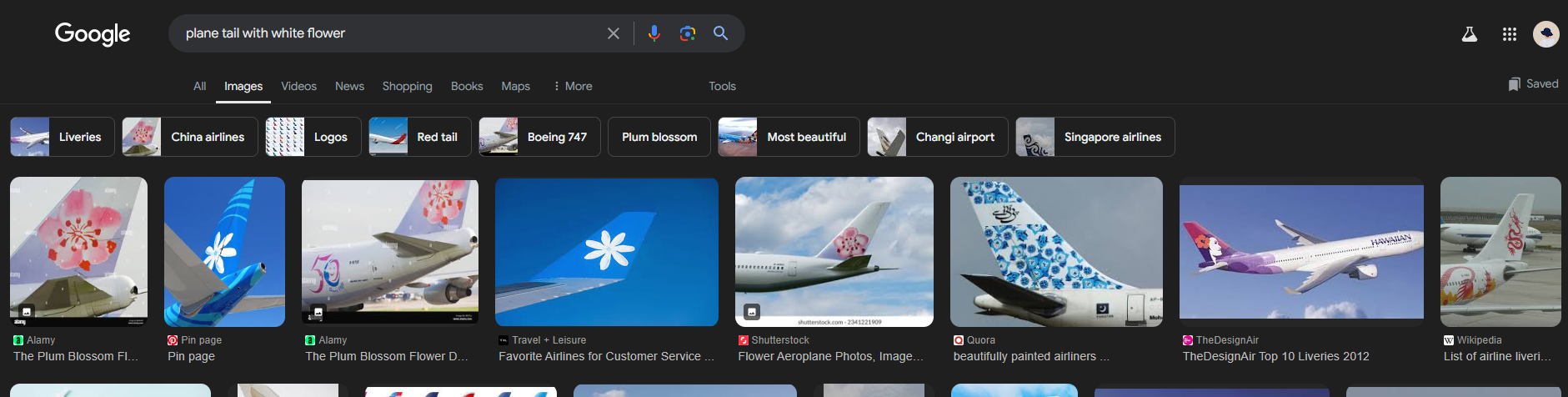
5) The 2nd and 4th picture shows the result of the image.
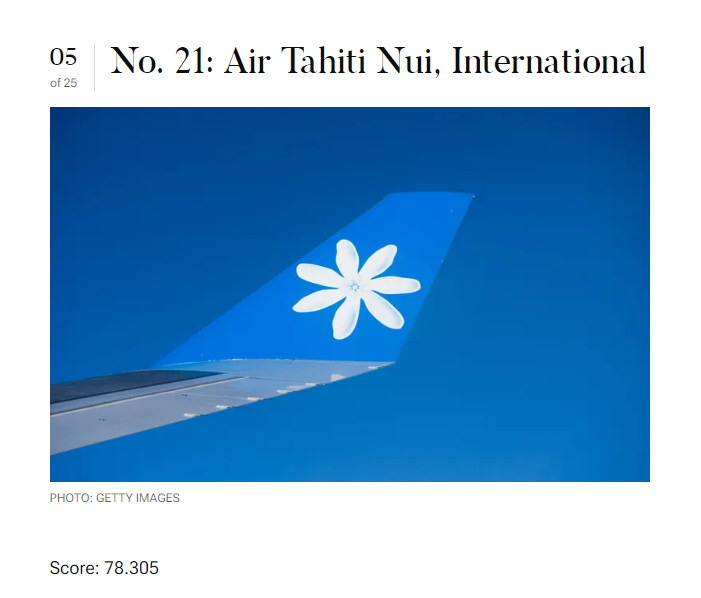
6) Now, we know that the airline is Air Tahiti Nui, International.
7) Based on the description, they want the airline's hub and the three letter airport IATA code. Hence, we search air tahiti nui airport hub on Google.
8) Based on the Google result, it show Fa'a'ā International Airport and it also show the code for the airline, which is PPT.
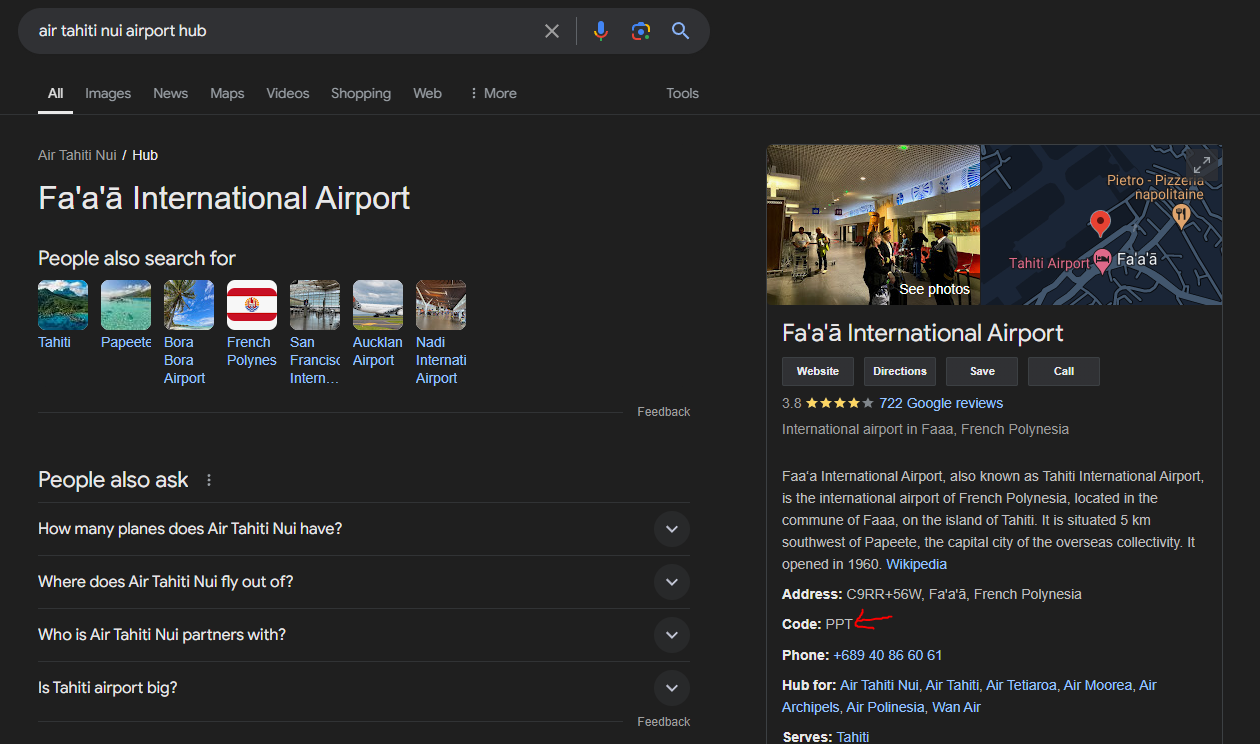 Search result
Now, wrap the code in the flag format. Hence the flag is n00bz{PPT}.